

SMS Usage
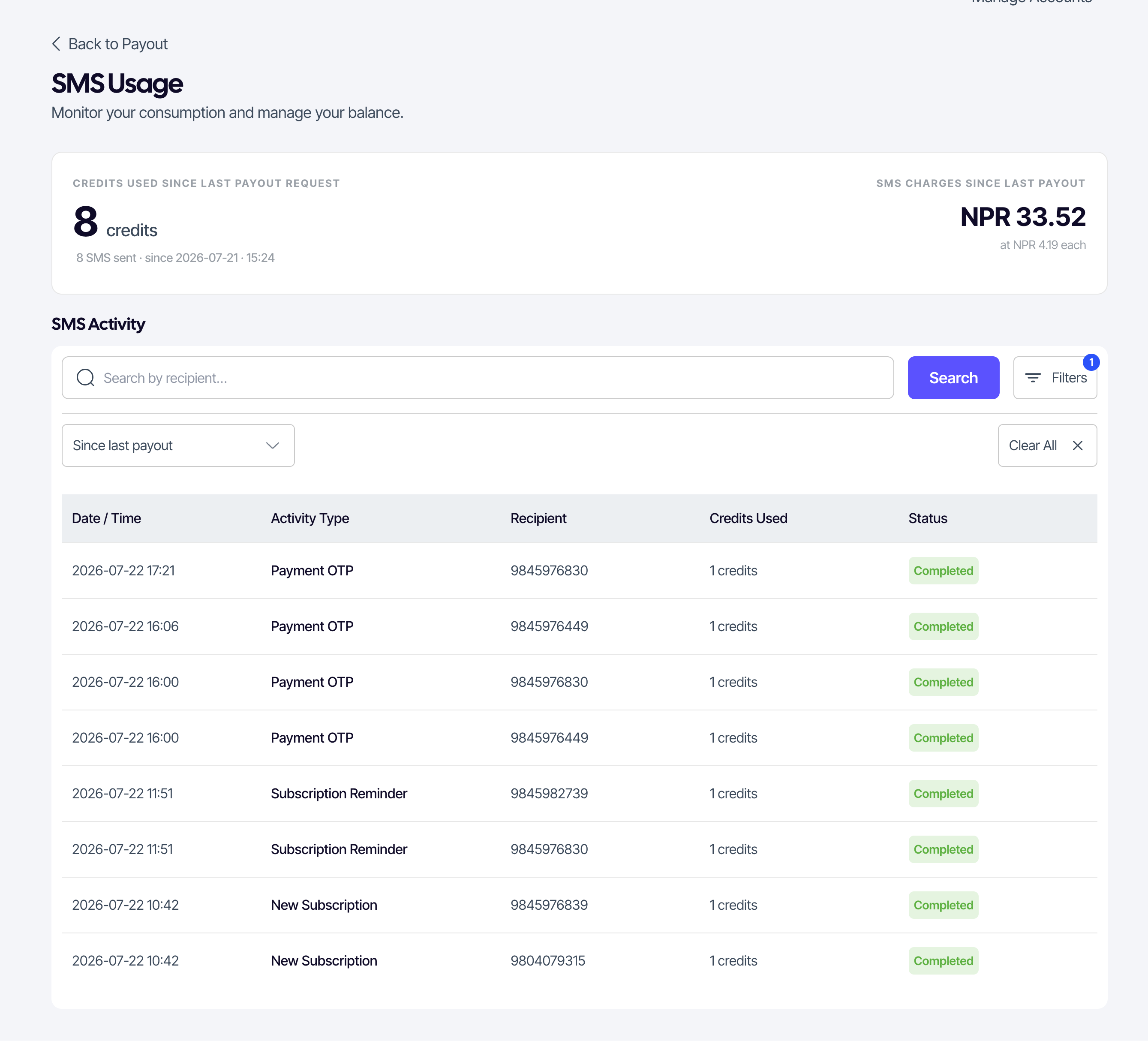
SUQO sends automated payment reminders and notifications to your customers by SMS. SMS is pay-as-you-go: you're billed per message and the charges are deducted from your payout — there's no prepaid balance to buy or top up. The SMS Usage page is a read-only report of what you've sent and what it has cost since your last payout.
How it works
Every automated reminder SUQO sends consumes SMS credits, which are billed to you per credit. The per-credit rate is published at suqo.ai/pricing. It is important to note that not all SMS cost exactly 1 credit — the credit cost varies based on the length of the message (character count) and the encoding used. You don't pay upfront: the credits used are totalled and their cost is deducted from your available balance when you request a payout.
Getting to the page
Open SMS Usage from the View SMS usage link on the Payout page (in the SMS Charges line of the amount breakdown). A Back to Payout button at the top returns you there.
What you've used
The card at the top summarises your consumption since your last payout request:
- Credits used since last payout request — the total credits consumed, plus the number of SMS sent and the date counting started.
- SMS charges since last payout — the amount you'll be charged for those credits, shown in NPR, along with the per-credit rate applied.
These same charges appear as the SMS Charges line on your Payout page and are subtracted from your Payout Available Amount.
SMS Activity
The SMS Activity table logs every message sent. Here is what the columns represent:
- Date / Time: When the message was sent.
- Activity Type: The reason the SMS was sent (e.g., Subscription Reminder, New Subscription, Renewal Reminder, Billing Period Change, Payment OTP).
- Recipient: The customer phone number the message was sent to.
- Credits Used: The number of credits this message consumed (may be greater than 1 depending on message length).
- Status: The state of the message (e.g., Successful, Failed).
Filter the table by date range — the default is Since last payout, matching the totals in the card above — or search by recipient to find messages sent to a specific customer.